Web searching and bookmarks using Rofi
Inspired in a recent DT video and his Gitlab repository, I revamped my websearch shell script I’ve been using with Rofi.
I already had something very similar to this, but I took this opportunity to review the code and to separate my old websearch script into two scripts:
- websearch: web searching in an handful of sites
- bookmarks: quickly open bookmarks
websearch
This script allows for searching in a number of sites.
You can add your own sites by adding a new ‘options’ line.
 1cat ~/.local/bin/websearch
 2
 3  #!/usr/bin/env bash
 4
 5  DMBROWSER="$BROWSER"
 6
 7  declare -A options
 8  options[searx]="https://searx.tuxcloud.net/?q="
 9  options[amazon]="https://www.amazon.com/s?k="
10  options[kindlebooks]="https://www.amazon.com/s?rh=n%3A154606011&ref=nb_sb_noss&k="
11  options[youtube]="https://www.youtube.com/results?search_query="
12  options[goodreads]="https://www.goodreads.com/search?q="
13  options[archaur]="https://aur.archlinux.org/packages/?O=0&K="
14  options[archpkg]="https://archlinux.org/packages/?sort=&q="
15  options[archwiki]="https://wiki.archlinux.org/index.php?search="
16  options[audible]="https://audible.com/search?keywords="
17  options[duckduckgo]="https://duckduckgo.com/lite/?q="
18  options[github]="https://github.com/search?q="
19  options[gitlab]="https://gitlab.com/search?search="
20  options[google]="https://www.google.com/search?q="
21  options[reddit]="https://www.reddit.com/search/?q="
22
23  while [ -z "$engine" ]; do
24    engine=$(printf '%s\n' "${!options[@]}" | sort | rofi -dmenu -p 'Choose search engine:') || exit
25    url="${options["${engine}"]}" || exit
26  done
27
28  while [ -z "$query" ]; do
29    query=$(echo "$engine" | rofi -dmenu -p 'Enter search query:') || exit
30  done
31
32  $DMBROWSER "$url""$query"
I then add to my ~/.config/i3/config file:
1bindsym $mod+f exec --no-startup-id websearch

bookmarks
UPDATED: I have a reviewed script here.
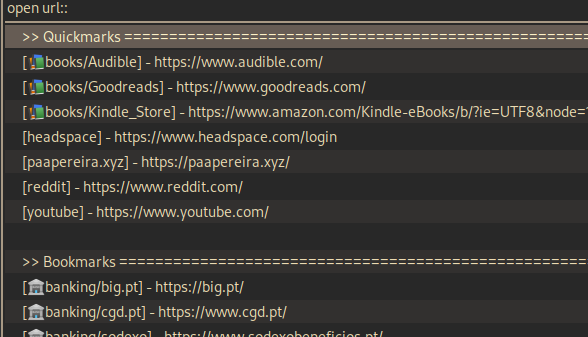
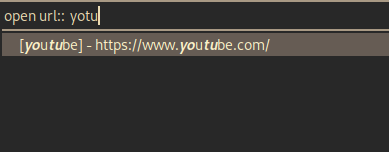
I use this script to quickly open my bookmarks.
I keep the bookmarks in 2 files:
- quickmarks.txt: with a short list of my most used bookmarks
- bookmarks.txt: all of my bookmarks
 1cat ~/.local/bin/bookmarks
 2
 3  #!/usr/bin/env bash
 4  default_browser="$BROWSER"
 5
 6  cat $HOME/.local/bin/quickmarks.txt | grep -v "^#" > /tmp/quickmarks.txt_tmp
 7  cat $HOME/.local/bin/bookmarks.txt | grep -v "^#" > /tmp/bookmarks.txt_tmp
 8  quickmarks_file="/tmp/quickmarks.txt_tmp"
 9  bookmarks_file="/tmp/bookmarks.txt_tmp"
10
11  readarray -t qmarks < "${quickmarks_file}"
12  readarray -t bmarks < "${bookmarks_file}"
13
14  qmlist=$(printf '%s\n' "${qmarks[@]}" | awk '{print "["$1"] - "$NF}' | sort)
15  bmlist=$(printf '%s\n' "${bmarks[@]}" | awk '{print "["$1"] - "$NF}' | sort)
16
17  separator="================================================================================"
18  choice=$(printf '%s\n' ">> Quickmarks ${separator}" "$qmlist" "" ">> Bookmarks ${separator}" "$bmlist" | rofi -dmenu -i -l 20 -theme ~/.config/rofi/themes/gruvbox-dark.rasi -p 'open url:' "$@" ) || exit
19
20  if [[ `echo "$choice" | grep -c "^>>"` -eq 0 && "$choice" ]]; then
21    url=$(echo "${choice}" | awk '{print $NF}') || exit
22    nohup ${default_browser} "$url" >/dev/null 2>&1 &
23  fi
 1cat ~/.local/bin/quickmarks.txt
 2
 3  #-------------------------------------------------------------------------------
 4  📚books/Goodreads       https://www.goodreads.com/
 5  📚books/Audible         https://www.audible.com/
 6  📚books/Kindle_Store    https://www.amazon.com/Kindle-eBooks/b/?ie=UTF8&node=1286228011&ref_=sv_kstore_1
 7  #-------------------------------------------------------------------------------
 8  headspace               https://www.headspace.com/login
 9  reddit                  https://www.reddit.com/
10  youtube                 https://www.youtube.com/
11  paapereira.xyz          https://paapereira.xyz/
1cat ~/.local/bin/bookmarks.txt
2
3  #-------------------------------------------------------------------------------
4  📚books/Deadhouse_Gates_Guide  https://docs.google.com/presentation/d/1-Rqhn-lK66YQKPwZQNbHmuCLBc0d7zwvRLUJFkM3s50/edit#slide=id.g3fd7d324ec_0_0
5  #-------------------------------------------------------------------------------
6  🏦banking/cgd.pt        https://www.cgd.pt/
7  🏦banking/big.pt        https://big.pt/
8  🏦banking/sodexo        https://www.sodexobeneficios.pt/
9  #-------------------------------------------------------------------------------
I then add to my ~/.config/i3/config file:
1bindsym $mod+Shift+f exec --no-startup-id bookmarks