Upgrading to Ubuntu 12.10
The current Ubuntu version, 12.10 Quantal Quetzal, was released passed October, and I’ve been running it since that time.
I hadn’t made a direct upgrade at quite some time. Normally I use the alternate iso (see my 11.10 upgrade post, but this time I chose to upgrade directly through Updater Manager from my 12.04 installation.
Backup
Your first step should always be backing up your files.
You can use an external drive, CDs or DVD, offline locations (like rsync.net), Dropbox… Take your pick, but do it. Really, you should.
Upgrading
Before starting the upgrade, be sure you have have all your current version updates installed in the Update Manager.
Then, go to Software Sources, and into the “Updates” tab:
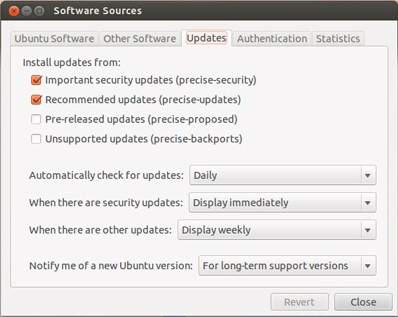
In the “Notify me of a new Ubuntu version” option select the option “For any new version”:

Go back to the Update Manager and start the upgrade:
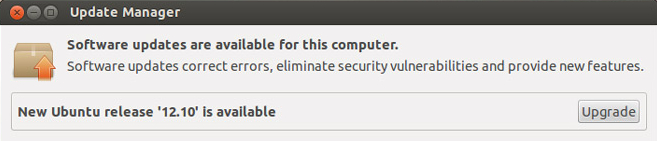
That’s it.
Unity’s online search results
Ubuntu 12.10 presented a new Amazon lens to Unity that presents shopping results based on user queries.
If you want to deactivate that option go to System Settings > Privacy and disable online search results.
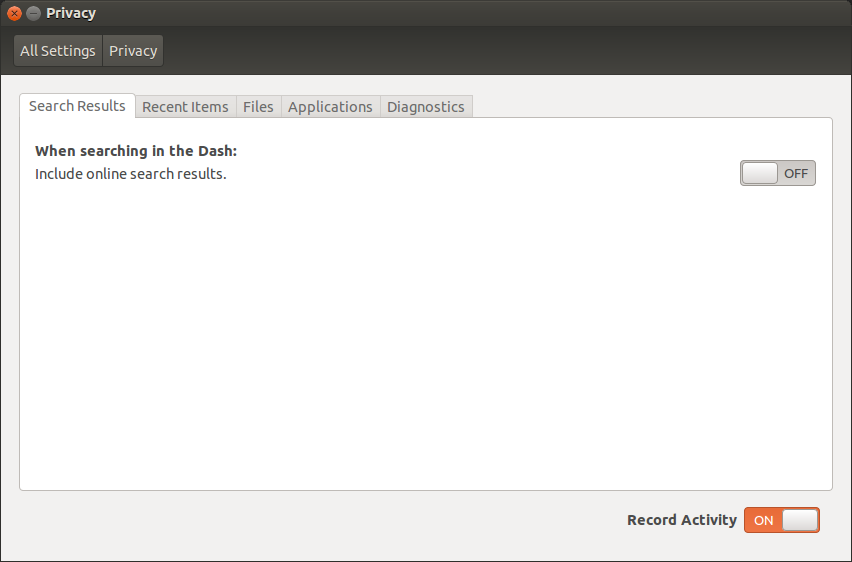
You can also remove the Amazon lens completely:
1sudo apt-get remove unity-lens-shopping
Extra software installed
- Phatch (photo batch processor)
1sudo apt-get install phatch
- Nemo file manager
1sudo add-apt-repository ppa:gwendal-lebihan-dev/cinnamon-nightly
2sudo apt-get update
3sudo apt-get install nemo nemo-data nemo-fileroller nemo-dropbox nemo-share
- System Load Indicator
1sudo add-apt-repository ppa:indicator-multiload/stable-daily
2sudo apt-get update
3sudo apt-get install indicator-multiload
- Ubuntu One Indicator
1sudo apt-add-repository ppa:rye/ubuntuone-extras
2sudo apt-get update
3sudo apt-get install indicator-ubuntuone
- Woof
1sudo apt-get install woof
- Nethogs
1sudo apt-get install nethogs
- Preload
1sudo apt-get install preload