New Xteink X4 ebook reader
Just got myself a Xteink X4 ebook reader. It will be a companion for my Kindle Paperwhite, not a replacement.
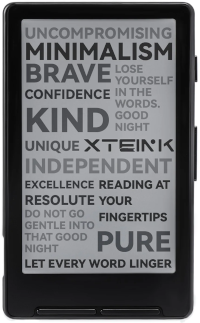
The Xteink X4 is an ultra-thin, palm-sized pocket eReader created by an upstart tech company. It is widely recognized for its minimalist, distraction-free design and its unique magnetic-ready back, which allows users to attach it directly to the back of a smartphone using MagSafe-style rings. Key Specifications
- Display: 4.3-inch glare-free E-Ink screen (220 ppi, 800×480 resolution).
- Dimensions: 4.9mm thin.
- Weight: 74 grams (significantly lighter than a standard smartphone).
- Storage: 16GB internal capacity via an included MicroSD card, storing thousands of books.
- Processor: Powered by an ESP32 chip with built-in Wi-Fi and Bluetooth.
- Battery: 650 mAh capacity, offering a 14-day battery life depending on daily reading habits.
- Hardware Controls: Features physical page-turn buttons.
- Lighting: Built without a front light to keep the profile ultra-thin and maximize paper-like display clarity.
An excellent resource and community for this device it’s the readme.club and Reddit.
Installing Crosspoint Reader Firmware
The best and simplest way to install the Crosspoint Reader Firmware is to use the web flash tool.
You can read more about this custom firmware and how to install at github.
CrossPoint is open-source e-reader firmware - community-built, fully hackable, free forever. It’s maintained by a growing community of developers and readers who believe your device should do what you want - not what a manufacturer decided for you.
In my case, using Arch Linux I had to do 2 things first:
- Add my user to the
uucpgroup:
1ls -l /dev/ttyACM*
2
3sudo gpasswd -a $(whoami) uucp
- Install Edge to flash the firmware via USB from the browser itself.
yay -S microsoft-edge-stable