Mounting Chrome cache in memory
As seen in my Ubuntu 12.04 installation post, I use a script to keep the Chrome cache in RAM.
I found this tip somewhere (don’t recall where) and have been using it for some time now.
Mounting Chrome cache in memory will give you the speed of RAM vs. the speed of an hard drive.
Do you have any more tips like this?
Script
- Create the script:
1vi ~/bin/chrome_tmp_cache.sh
- Add the following to the script:
1#!/bin/bash
2if test -d /tmp/chrome; then
3  exit 0
4else
5  rm -r ~/.cache/google-chrome
6  mkdir /tmp/chrome
7  ln -s /tmp/chrome ~/.cache/google-chrome
8fi
- Change the script permissions:
1chmod +x bin/chrome_tmp_cache.sh
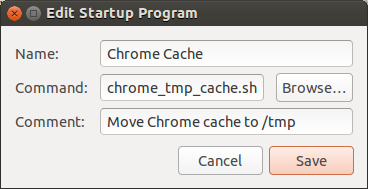
- Add the script to the Startup Applications:
1Name: Chrome Cache
2Command: /home/<user>/bin/chrome_tmp_cache.sh
3Comment: Move Chrome cache to /tmp
Mounting /tmp in RAM
For this script to work, /tmp must be mounted in memory. Just add the following to your /etc/fstab file:
- Open /etc/fstab as root
1gksu gedit /etc/fstab
- Add the following line
1tmpfs /tmp tmpfs nodev,nosuid,noatime,mode=1777 0 0